
How do I upload medical records?
Past medical records help us build your medical profile and optimise your Everlab journey. If you have results from private providers or previous medical history, uploading these ensures our doctors have the most comprehensive picture of your health.
Why should I upload medical records?
Your past medical records can assist us with:
Identifying trends, risk factors and early warning signs
Helping our doctors to tailor recommendations on lifestyle, preventative care, and additional testing
How to upload my medical records?
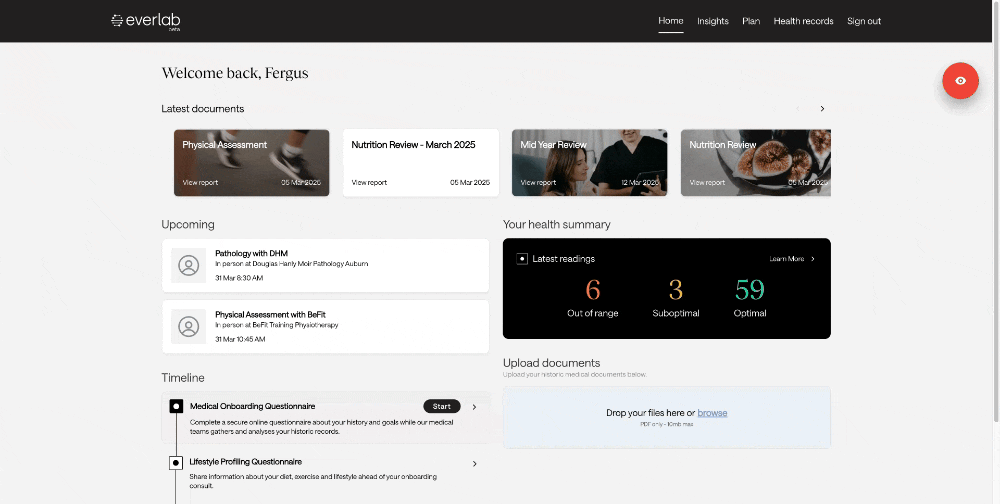
You can securely upload your medical records via the Everlab Dashboard. Just follow these steps:
Open and log in to your Everlab Dashboard
Prepare the reports you wish to upload, and make sure they meet the following requirements:
PDF format only
Maximum file size: 10MB per document
Clear and legible scans
Exclude any personal information not related to medical care
On the home page, locate the Upload Documents section
Either drag and drop the files into the box, or click ‘Browse’ to select them from your computer
Review the terms and conditions
Tick the box to agree to the terms
Click ‘Upload Documents’
What Happens Next?
Once this process is completed, the Everlab team will review the documents and upload any relevant results or notes into your Dashboard for your doctor to review.
If you have issues uploading your medical records, you can contact support@everlab.com.au to help you upload directly.
Related articles